If you're a freelancer who doesn't want to pay monthly fees for tools like Zapier or Make, n8n is your answer. It's a powerful, open‑source automation platform that you can host yourself for free – or use their generous cloud plan.
In this guide, I'll show you how to get started with n8n, compare it to Zapier, and share real‑world automations for freelancers.
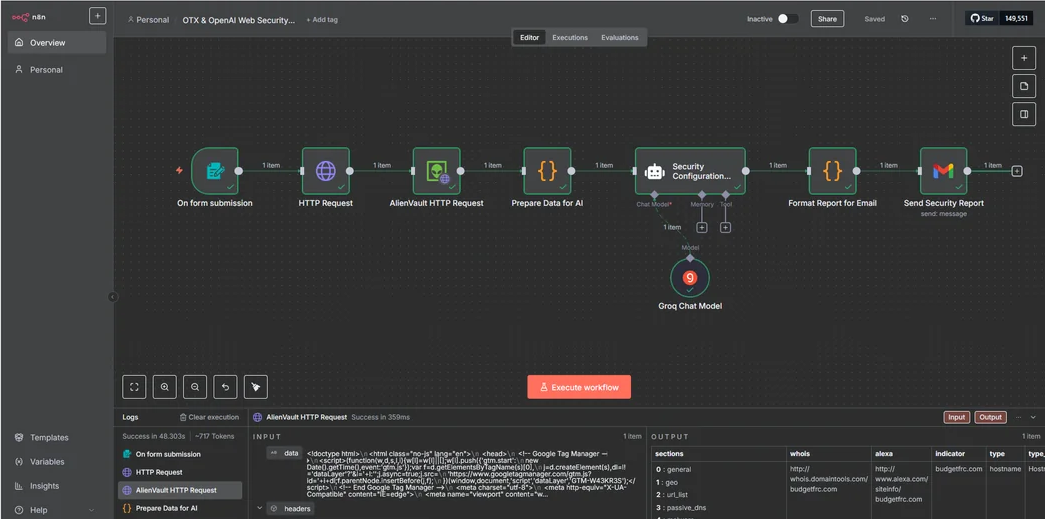
What is n8n?
n8n (pronounced "n-eight-n") is a fair‑code licensed automation tool. You can self‑host it on your own server (VPS, Raspberry Pi, or even your local computer) and enjoy unlimited workflows without recurring costs. Alternatively, use n8n.cloud (paid) for a managed solution.
Why Freelancers Love n8n
- Zero monthly fees – Self‑host = no subscription (just hosting costs).
- Unlimited workflows – No operation limits, no task caps.
- 400+ nodes – Integrates with most popular apps (Google, Slack, Notion, GitHub, etc.).
- Privacy – Your data stays on your server.
- Code node – Write JavaScript/Python for advanced logic.
Self‑Hosting vs n8n.cloud
| Feature | Self‑hosted (Free) | n8n.cloud (Paid) |
|---|---|---|
| Cost | Free (server cost only) | Starts at $20/month |
| Maintenance | You manage updates, backups, SSL | Fully managed |
| Scalability | Depends on your server | Auto‑scaling |
| Support | Community | Priority support |
| Execution logs | Infinite (disk space) | 30‑90 day retention |
Getting Started (Self‑hosted)
- Rent a small VPS (e.g., DigitalOcean, Hetzner, or Oracle Free Tier).
- Install Docker and docker-compose.
- Use the official n8n Docker image (or run
npx n8nlocally for testing). - Access the web UI at
http://your-server-ip:5678. - Create your first workflow: drag and drop nodes, connect them, and activate.
If you prefer a one‑click install, many hosting providers offer n8n as a pre‑built app.
Example Workflows for Freelancers
- Auto‑backup client files: When a new file is added to a Google Drive folder, copy it to Dropbox.
- Invoice creation: When a Trello card moves to "Invoicing", create a draft invoice in FreshBooks via HTTP request.
- Slack bot for lead alerts: When a new Typeform entry arrives, send a formatted message to a Slack channel.
- Daily email digest: Every morning, send yourself a summary of upcoming deadlines from a Google Sheet.
n8n vs Zapier vs Make
n8n is the only open‑source option. It's ideal if you have technical skills and want to avoid monthly fees. Zapier is easier for beginners but expensive. Make offers a balance of power and affordability. For freelancers who can self‑host, n8n wins on price and flexibility.
Pricing Breakdown
- Self‑hosted – Free (except server cost ~$5‑$10/month).
- n8n.cloud – Starter plan: $20/month (2,500 workflow executions).
- n8n.cloud – Pro plan: $50/month (10,000 executions).
Most freelancers should start with self‑hosted on a cheap VPS or even on their local machine for testing. Once your automations grow, you can migrate to n8n.cloud for convenience.
Conclusion – The Power of Open Source Automation
n8n empowers freelancers to automate without recurring costs. It has a steeper learning curve than Zapier, but the freedom and unlimited potential are worth it. Start with a simple workflow, then gradually build your automation empire.
Get started with n8n:
Try n8n.cloud free →
Self‑hosting guide →