Notion and Airtable are two of the most powerful productivity tools for freelancers. Both offer databases, collaboration, and automation. But they shine in different areas. In this guide, I compare them side‑by‑side to help you decide which one (or both) should power your freelance business.
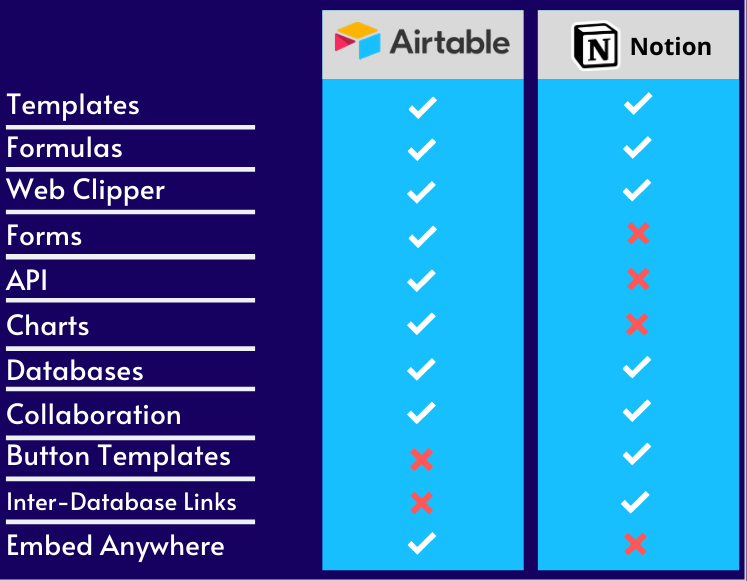
Quick Overview
| Feature | Notion | Airtable |
|---|---|---|
| Core strength | All‑in‑one workspace (notes, wikis, databases, tasks) | Relational database with spreadsheet interface |
| Data structure | Databases (linked) + free‑form pages | Tables linked via relationships (like true relational DB) |
| Views | Table, board, calendar, list, gallery, timeline | Grid, kanban, calendar, gallery, form, timeline |
| Offline access | Limited (mobile app supports offline) | No (cloud‑only) |
| Free tier | Unlimited pages, 1,000 blocks/workspace (enough for most freelancers) | 1,200 records/base, 2GB attachment space |
| Paid plans start at | <$8/user/month | <$20/seat/month |
| Automation | Built‑in (limited on free), plus Zapier/Make | Built‑in (limited on free), plus Zapier/Make |
When to Choose Notion
- You need an all‑in‑one workspace – notes, project tracking, CRM, documentation, wikis.
- You prefer free‑form content – you write a lot of text, embed images, create nested pages.
- You want a simple task board or content calendar – Notion's databases are flexible enough for most freelancers.
- You need a public website or documentation portal – Notion can be published to the web.
When to Choose Airtable
- You work with highly structured relational data – e.g., clients, projects, invoices, inventory, leads.
- You need advanced field types – attachments, barcodes, formulas, lookups, rollups.
- You want to build client‑friendly forms or portals – Airtable's forms are powerful; combined with Softr/Pory you can build client dashboards.
- You need real‑time collaboration on the same data set with granular permissions.
Real‑World Example: Managing Client Projects
Scenario: You have 10 clients, each with multiple projects, each project has tasks, deadlines, and invoices.
- In Notion – You'd create a Clients database, a Projects database linked to Clients, and a Tasks database linked to Projects. It works well, but rollups and formulas are less powerful than Airtable. Also, Notion's automation (e.g., send an email when a task is due) requires third‑party tools.
- In Airtable – Same structure, but you can use rollup fields to sum invoices per client automatically, use lookup fields to show client info in projects, and create forms for clients to submit updates. Built‑in automations (email, Slack) work without extra cost.
Verdict: For simple project management, both work. For heavy relational data and advanced automations, Airtable wins. For content‑heavy workspaces (client wikis, onboarding docs), Notion wins.
Pricing for Freelancers
- Notion – Free plan is very generous (unlimited pages, 1,000 blocks per workspace). Most freelancers never exceed the block limit unless they embed many large files. Paid plan ($8/month) adds version history, unlimited blocks, and more guests.
- Airtable – Free plan is limited (1,200 records per base). For a freelancer with many clients, you may hit that limit quickly. Pro plan ($20/month) is expensive but powerful.
If budget is tight: Start with Notion. It covers 80% of use cases for free. Upgrade to Airtable only if you need advanced relational features.
Can You Use Both?
Absolutely. Many freelancers use Notion as their knowledge base, documentation, and light project tracker, and Airtable as their operational database (leads, sales pipeline, invoicing). Sync them via Zapier or Make – e.g., when a new lead is added in Airtable, create a client page in Notion.
Conclusion – The Verdict
Choose Notion if: You want an all‑in‑one workspace with free‑form content, wikis, and simple project tracking at no cost.
Choose Airtable if: You need a true relational database with advanced field types, forms, and automations – and you're willing to pay for it.
Use both for the best of both worlds.
Try them for free:
Start Notion free →
Start Airtable free →