Three heavyweights of automation: n8n (open‑source), Zapier (the veteran), and Make (the visual powerhouse). Which one fits your freelance business? In this guide, I compare them head‑to‑head across pricing, features, ease of use, and real‑world scenarios.
Quick Overview
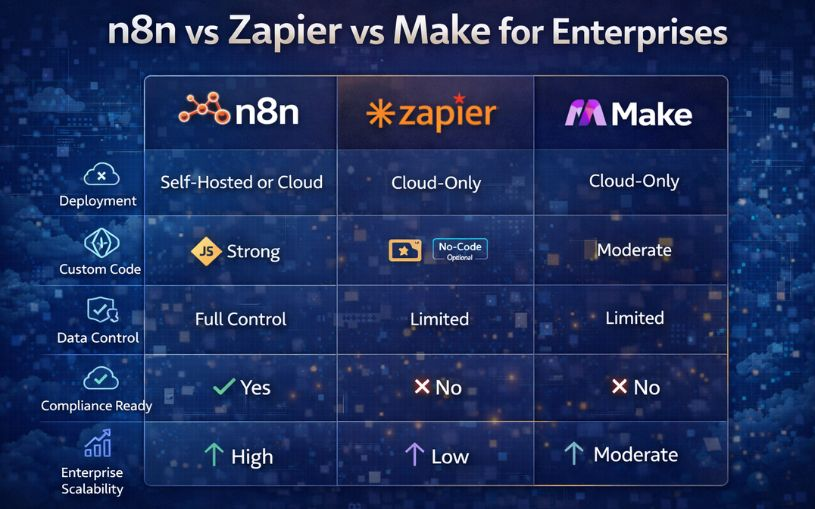
| Feature | n8n | Zapier | Make (Integromat) |
|---|---|---|---|
| License | Open‑source (fair‑code) | Proprietary | Proprietary |
| Hosting | Self‑host (free) or n8n.cloud (paid) | Cloud only | Cloud only |
| Free tier | Self‑host = unlimited, cloud = limited | 100 tasks/month, 5 Zaps | 1,000 operations/month, unlimited scenarios |
| Paid starts at | <$20/month (cloud) | <$19.99/month | <$10.59/month |
| Learning curve | Moderate (technical) | Low (beginner‑friendly) | Moderate (visual logic) |
| App integrations | 400+ (community growing) | 5,000+ | 1,500+ |
| Data transformation | Powerful (code node) | Limited | Very powerful (routers, aggregators) |
When to Choose n8n
- You're technical – comfortable with Docker, servers, or command line.
- You want unlimited automations for a fixed low cost – self‑host on a $5 VPS.
- You need to keep data private – everything stays on your server.
- You like open‑source and community extensions.
When to Choose Zapier
- You're a beginner – no technical skills required.
- You need the largest library of apps – 5,000+ integrations.
- You want a simple, step‑by‑step editor – no visual programming.
- Your automations are linear (not complex).
When to Choose Make (Integromat)
- You need complex, multi‑branch automations – routers, aggregators, loops.
- You want a visual flowchart builder – easier to understand than Zapier's linear Zaps for complex logic.
- You're on a budget – cheaper than Zapier for similar usage.
- You need powerful data transformation tools built‑in.
Real‑World Example: Handling Lead Data
Scenario: A lead fills a Typeform. You need to check if their email domain is "gmail.com" (personal) or "company.com" (business). If business, add to a CRM and send a VIP Slack message. If personal, add to a different sheet and send a standard email.
- Zapier – Requires multiple Zaps or a Professional plan with paths (expensive). Doable but clunky.
- Make – One scenario with a router and filters. Perfect, visual, affordable.
- n8n – One workflow with an IF node. Requires self‑hosting or cloud plan, but very flexible.
Pricing Comparison for Freelancers (mid‑range usage, ~5,000 tasks/ops per month)
- n8n – Self‑host: $5/month (VPS) + unlimited. n8n.cloud: $20/month.
- Zapier – Professional plan: $49/month (5,000 tasks). Very expensive.
- Make – Pro plan: $10.59/month (10,000 ops). Best value.
If you're technical, n8n self‑hosted is the cheapest long‑term. If not, Make offers the best balance of power and price. Zapier is easiest but most costly.
Conclusion – The Verdict
Choose Zapier if simplicity and app choice matter most and budget isn't a constraint.
Choose Make if you need visual complex workflows at a reasonable price.
Choose n8n if you want ultimate control, privacy, or unlimited automations on a budget – and you're not afraid of self‑hosting.
Try them for free:
n8n (self‑host or cloud) →
Zapier free →
Make (Integromat) free →