As a freelancer, you may be asked to build a simple web app – a client portal, an internal tool, or a prototype. Bubble.io lets you create fully functional web applications without writing a single line of code. In this tutorial, I'll introduce you to Bubble's core concepts and show you how to build a real‑world app for a client.
What is Bubble.io?
Bubble is a no‑code platform that allows you to build responsive web applications. You can create databases, design interfaces (drag‑and‑drop), and define workflows (logic) – all without coding. It's used by freelancers to build MVPs, client portals, marketplaces, SaaS tools, and more.
Why Learn Bubble as a Freelancer?
- High demand – Many small businesses need custom software but can't afford traditional developers.
- Quick turnaround – Build a prototype in days instead of months.
- Recurring income – Host and maintain the app for your clients (Bubble has white‑labelling options).
- Affordable – Free to learn, paid plans start at $29/month (or pass costs to client).
Core Concepts
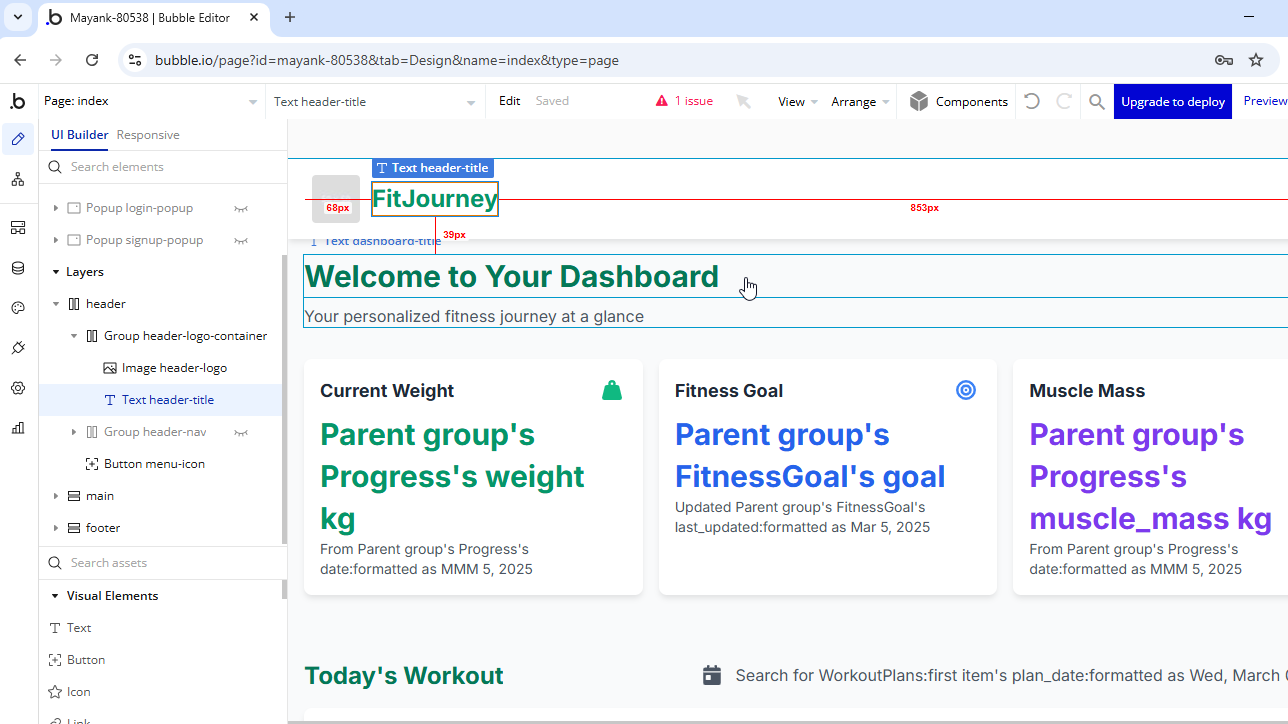
- Design page – Arrange elements (text, inputs, buttons, repeating groups).
- Data types & fields – Create database tables (e.g., "Client", "Project").
- Workflows – Define what happens when a user clicks a button or submits a form.
- Responsive engine – Bubble adapts to different screen sizes automatically (with some adjustments).
- Plugins & APIs – Extend functionality with pre‑built plugins or connect to external APIs.
Step‑by‑Step: Build a Simple Client Portal
Goal: A portal where clients can log in, view their projects, and upload files.
- Sign up for a free Bubble account – Start here →
- Create a new app – Choose a template or start from scratch.
- Design the login/signup page – Add input fields for email/password, a button, and a workflow to sign up or log in.
- Create data types – "User" (built‑in), "Project" (fields: name, status, due date, client – relation to User).
- Create a "Dashboard" page – Add a repeating group to show logged‑in user's projects.
- Add a form to create a new project – Inputs, button, workflow to create a new Project record and associate it with the current user.
- Add file upload – Use Bubble's file upload element to allow clients to upload documents, save them to the database.
- Test and publish – Bubble gives you a live URL instantly.
Pricing for Freelancers
- Free plan – Bubble branding, limited capacity. Good for learning and prototyping.
- Personal plan – $29/month (billed monthly) or $25/month (yearly). Remove Bubble branding, custom domain.
- Professional plan – $59/month. More capacity, priority support.
- Production plan – $129/month. For high‑traffic applications.
You can build the app for free and then upgrade to a paid plan when you're ready to launch or add a custom domain.
Monetization Ideas for Freelancers
- Build MVPs for clients – Charge a one‑time fee ($1,000 – $5,000) for a working prototype.
- Offer maintenance & hosting – Manage the Bubble app for a monthly fee ($100–$300).
- Create templates – Build reusable app templates and sell them on Bubble's marketplace or Gumroad.
- Build your own SaaS – Launch a subscription tool and keep 100% of the revenue.
Learning Resources
- Bubble Academy – Free tutorials and videos.
- Bubble's manual – Comprehensive documentation.
- YouTube channels – Coaching No‑Code Apps, Buildcamp.
- Bubble Forum – Ask questions and get help from the community.
Conclusion – A Lucrative Skill for Freelancers
Bubble.io opens up a new stream of income: building web apps for clients who need custom software but can't afford traditional development. Spend a few weeks learning the platform, and you'll be able to charge premium rates. Start with a small project (e.g., a personal dashboard) and gradually take on bigger clients.
Get started for free: Try Bubble.io →